
Quarto Integration
How Framework integrates with Quarto for notebooks and presentations
Overview
Framework thoughtfully integrates with Quarto, the open-source scientific publishing system. This integration provides automatic configuration, render directory management, sensible defaults for both notebooks and presentations, and a graphical user interface for managing these settings.
Render Directories
A key design principle in Framework is the separation of source files from rendered output. When you create a notebook or presentation, the .qmd source stays in its directory while rendered HTML/PDF output goes to a dedicated render directory.
Why separate source from output?
- Keep your working directories clean
- Rendered files are typically gitignored (they're regenerated)
- Easy to find rendered output in a consistent location
- Multiple formats can coexist without clutter
How It Works
When you enable notebooks in a project, Framework creates both directories:
| Project Type | Source Directory | Render Directory |
|---|---|---|
| Standard Project | notebooks/ |
outputs/notebooks/ |
| Privacy Sensitive | notebooks/ |
outputs/private/notebooks/ |
| Course/Teaching | slides/ |
rendered/slides/ |
Each source directory gets a _quarto.yml that tells Quarto where to put output:
project:
  output-dir: ../outputs/notebooks

format:
  html:
    theme: default
    embed-resources: true
    toc: true
Quarto Configuration
Framework generates _quarto.yml files with sensible defaults. These files are yours to customize. Framework only creates them once and won't overwrite your changes.
Using the GUI
Configure Quarto defaults through the GUI. Run setup() and navigate to Settings → Quarto:
framework::setup()
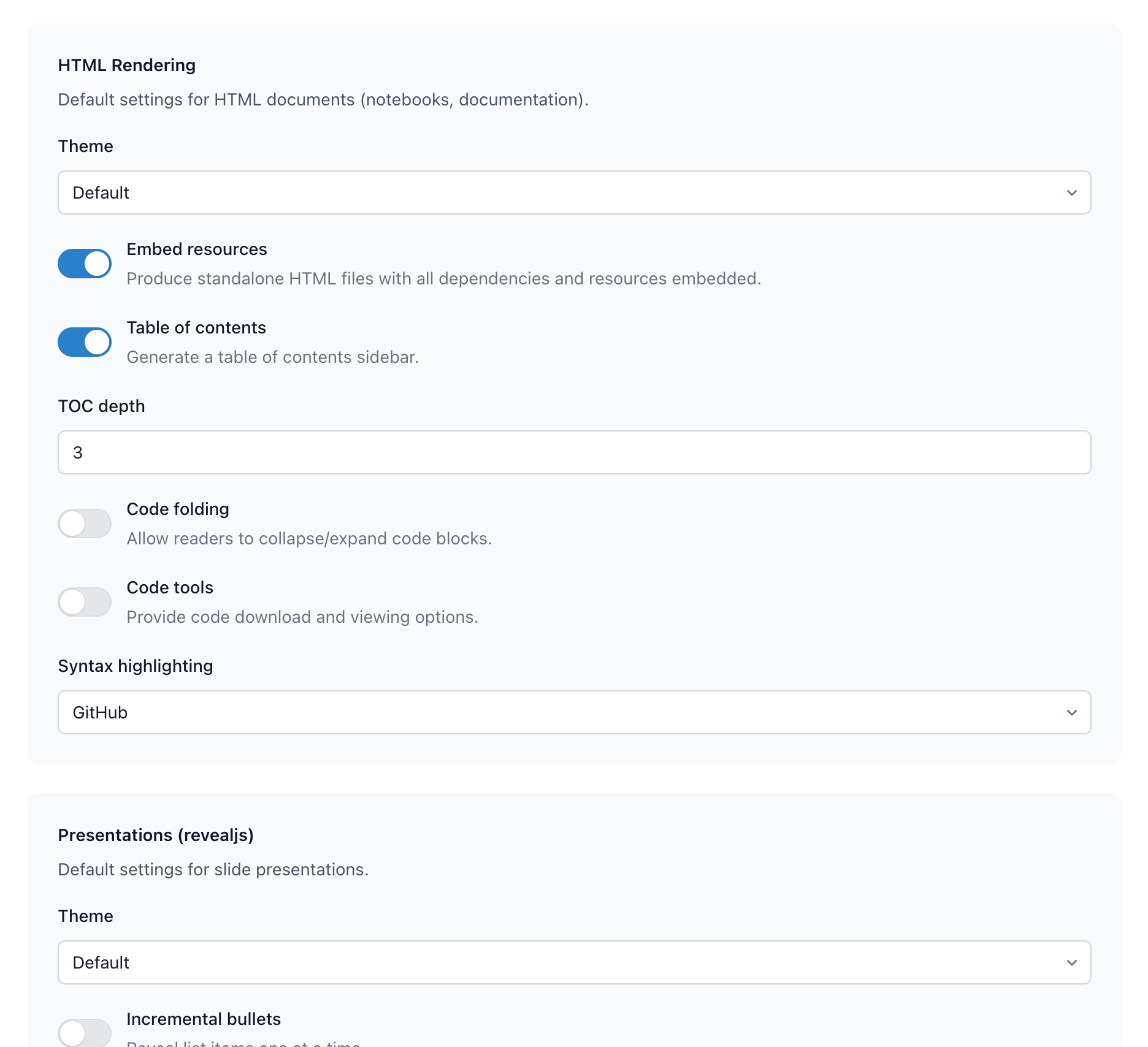
The GUI lets you configure:
HTML Rendering (notebooks, documentation):
- Theme selection
- Embed resources (standalone HTML files)
- Table of contents and depth
- Code folding and tools
- Syntax highlighting style
Presentations (revealjs):
- Theme selection
- Incremental bullets
- Slide numbers
- Transitions
Generated Files
Framework generates _quarto.yml in each source directory:
my-project/
├── _quarto.yml              # Root project config
├── notebooks/
│   ├── _quarto.yml          # Notebook-specific config
│   └── analysis.qmd
└── outputs/
    └── notebooks/           # Rendered output appears here
Customizing After Generation
Edit any _quarto.yml directly—Framework won't touch it after creation:
# notebooks/_quarto.yml
project:
  output-dir: ../outputs/notebooks

format:
  html:
    theme: cosmo              # Changed from default
    toc: true
    toc-depth: 4              # Deeper TOC
    code-fold: true           # Enable code folding
    code-tools: true          # Show code tools
    embed-resources: true
    highlight-style: github
Creating Quarto Files
Notebooks
Create new notebooks with make_notebook():
make_notebook("exploration")
make_notebook("modeling", subdir = "analysis")
This creates a .qmd file from your notebook template in the configured notebooks directory.
Presentations
For presentation projects or course slides:
make_presentation("quarterly-review")
Presentations use RevealJS format by default with appropriate settings for slides.
Rendering
From R
# Render a single file
quarto::quarto_render("notebooks/analysis.qmd")

# Render and save to outputs
save_notebook("notebooks/analysis.qmd")
From Terminal
# Render in place (uses _quarto.yml settings)
quarto render notebooks/analysis.qmd

# Render entire project
quarto render
Format-Specific Settings
HTML Documents
Default settings optimized for analysis notebooks:
format:
  html:
    theme: default
    embed-resources: true    # Standalone files
    toc: true                # Table of contents
    toc-depth: 3
    code-fold: false
    code-tools: false
    highlight-style: github
RevealJS Presentations
Default settings for slides:
format:
  revealjs:
    theme: default
    incremental: false       # All bullets at once
    slide-number: true
    transition: slide
    background-transition: fade
    controls: true
    progress: true
    center: true
    highlight-style: github
Regenerating Configurations
If you need to regenerate _quarto.yml files (for example, after changing global defaults), use the GUI's Regenerate Quarto Configs button.
Warning: This overwrites any manual customizations. Framework backs up existing files to .quarto_backups/ before regenerating.